Web development: 7 security mistakes to avoid from the design stage
Imagine a small online store. Customers view their orders, support staff answer questions, and administrators manage products. Everything works during the demo. But what happens if a customer requests someone else’s invoice, changes a price sent to the server, or posts an unexpected comment?
Security starts with these questions, before you even choose your website’s colours. Here are seven mistakes to avoid from the design stage, with fictional examples and checks to perform in your own test environment.
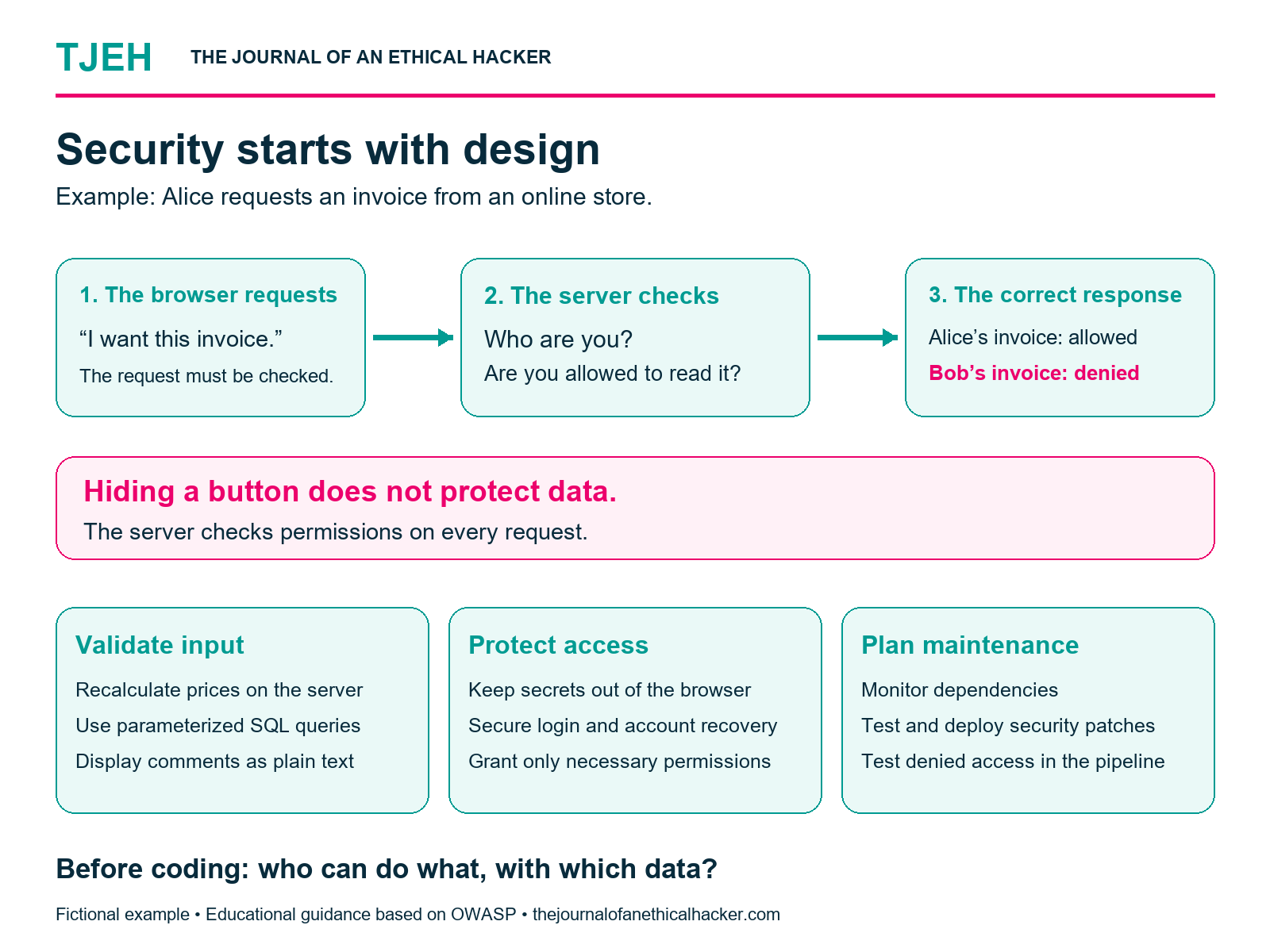
1. Confusing authentication with authorization
The mistake: assuming that anyone who is signed in can view any order, or simply hiding buttons intended for administrators.
Example: Alice should be able to read her own invoice, but not Bob’s. A hard-to-guess address does not replace permission checks.
Good practice: define who may do what, and to which data. The server must check permissions on every request, including document downloads. If permission has not explicitly been granted, deny the action.
Simple check: create two test accounts and two fictional orders. Verify that the first account cannot read or modify the second account’s order, or download its invoice.
Signing in establishes an identity; it does not grant every permission. Source: OWASP Authorization Cheat Sheet.
2. Trusting the browser to enforce business rules
The mistake: letting the browser decide the final price, the user’s role, or booking rules.
Example: a basket displays a product priced at €50. If the server blindly accepts the total submitted by the page, it entrusts an important decision to an environment controlled by the visitor.
Good practice: recalculate prices and discounts on the server using your catalogue. Validate the type, size and consistency of incoming data. For example, a quantity must be an integer within the limits defined by the store.
Simple check: in your API tests, submit a negative quantity and an unauthorized discount. The request should be rejected without creating an invalid order.
Form validation helps users; server-side validation enforces the rules. Source: OWASP Input Validation Cheat Sheet.
3. Mixing user input with SQL instructions
The mistake: building a database query by concatenating text from a form. SQL injection occurs when that input can change the meaning of the query.
Example: an email search should look for a value, not allow someone to rewrite the query.
Good practice: use parameterized queries. The code defines the operation, while parameters carry the values separately.
# Educational example using Python's sqlite3 module
cursor.execute(
    "SELECT id FROM clients WHERE email = ?",
    (email_saisi,)
)
The placeholder syntax depends on your database library. Do not replace it with string interpolation. An ORM does not protect raw queries constructed unsafely. The table and variable names above match the French example.
Simple check: verify that a name containing an apostrophe is handled as ordinary data. This check can reveal mistakes, but is not a complete security audit.
Source: OWASP SQL Injection Prevention Cheat Sheet.
4. Treating a comment as trusted code
The mistake: inserting user-generated content into a page as trusted HTML. A cross-site scripting (XSS) vulnerability can then cause the browser to interpret untrusted content as executable code.
Example: a customer review should appear as a review, not change how the page behaves.
Good practice: keep your framework’s automatic escaping enabled. To display plain text inside an HTML element, use a text-only operation such as textContent. If you allow rich text, sanitize the HTML with a maintained library. Protection depends on the output context: text, attributes and URLs require different handling.
Simple check: if reviews are plain text, entering <b>Hello</b> should display that text rather than bold formatting. This rendering check does not cover every XSS variant.
Source: OWASP Cross Site Scripting Prevention Cheat Sheet.
5. Exposing secrets in frontend code
The mistake: putting a database password or a secret email-service key in code delivered to the browser, or in a Git repository.
Example: a key stored in a frontend configuration variable may end up in the JavaScript downloaded by visitors. The variable’s name does not make it secret.
Good practice: keep secrets on the server, using an appropriate secret-management mechanism and only the permissions required. Separate development and production credentials. Keys explicitly designed to be public are a different case: follow the provider’s restrictions.
Simple check: inspect the files delivered to the browser and enable secret detection in your repository and pipeline. If a secret key has been exposed, revoke and replace it. Deleting the line is not enough.
Source: OWASP Secrets Management Cheat Sheet.
6. Focusing only on the login page
The mistake: carefully designing login while neglecting account recovery and protection against repeated attempts.
Example: a password-reset link is another route into the account. It deserves as much attention as the password.
Good practice: use established mechanisms from a maintained framework or identity provider. Plan for HTTPS, secure recovery, rate limits and appropriate multifactor authentication, particularly for administrators. If you store passwords, use a dedicated password-hashing mechanism from a reputable library, never plaintext.
Simple check: verify that a reset link expires and cannot be reused. Check what happens after repeated failed login attempts without unnecessarily locking out legitimate users.
Source: OWASP Authentication Cheat Sheet.
7. Planning the launch but not maintenance
The mistake: choosing libraries and launching the site without tracking their security updates.
Example: your own code may barely change, while the library that processes uploaded files receives a security advisory. Your application also depends on that component.
Good practice: maintain an inventory of dependencies and versions, monitor official advisories and assign responsibility for updates. Assess actual exposure, test patches and organize deployment. A scan with no findings does not prove that no vulnerabilities exist.
Simple check: choose a dependency and verify that you can find its installed version, official security advisories and your application’s update procedure.
Source: OWASP Vulnerable Dependency Management Cheat Sheet.
Your first step: a checklist for each feature
Before implementing “download an invoice”, answer these four questions with your team:
| Question | Example answer to validate |
|---|---|
| Who may perform the action? | The order owner and authorized support staff. |
| Which data needs protection? | The customer’s name, address and order details. |
| What misuse should be prevented? | Reading or changing another customer’s invoice. |
| How will you check this? | A test verifies that access across two different accounts is denied. |
These answers become acceptance criteria, just like “the button works”. Adapt them to your organization’s actual needs, then include the tests in your development process.
Key takeaway: security by design means defining permissions, rules and checks before a mistake becomes a habit. These seven points are a starting point, not a guarantee against every attack. Continue reviewing and testing while the application is in operation.
Official OWASP sources consulted on 5 November 2026. The store and testing examples are fictional and provided by TJEH for educational purposes.