Double authentication: how can an account still be hacked?
Double authentication: how can an account still be hacked?
In short: two-factor authentication blocks most stolen password attacks, but it only protects the connection. An account can still be compromised by a fake site, stolen session, infected device, mistakenly authorized app, or fragile account recovery. Remember to protect what happens before, during and after connection.
You have enabled two-factor authentication. To log in, you need your password and a second proof. However, an alert alerts you to access that you do not recognize. How is this possible?
Double authentication remains an important protection. But protecting the entry into an account is not always enough: it is also necessary to protect the device used, the session opened and the means to regain access.
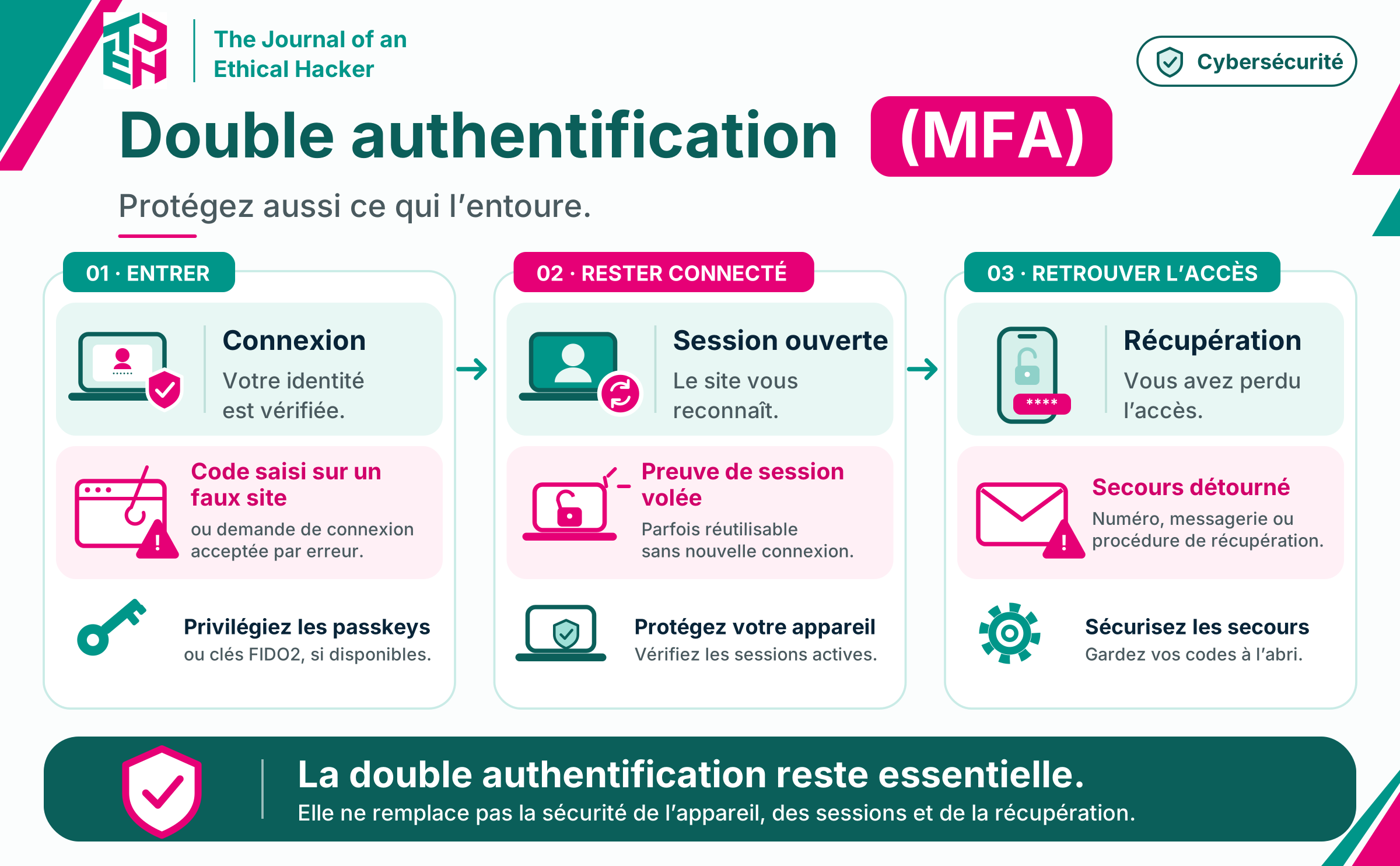
First, what does double authentication protect?
It combines two categories of evidence: something you know (your password), something you have (your phone or a security key), or something you are (your fingerprint or your face). Two passwords therefore do not constitute two different factors.
The objective: to prevent a stolen password from being enough to open your account. But not all methods resist the same attacks. An SMS code, a notification and a security key do not work the same way. Reference: OWASP, multi-factor authentication.
Three situations not to be confused
Before going into detail, here is a reading map. The eight cases below fall into three families:
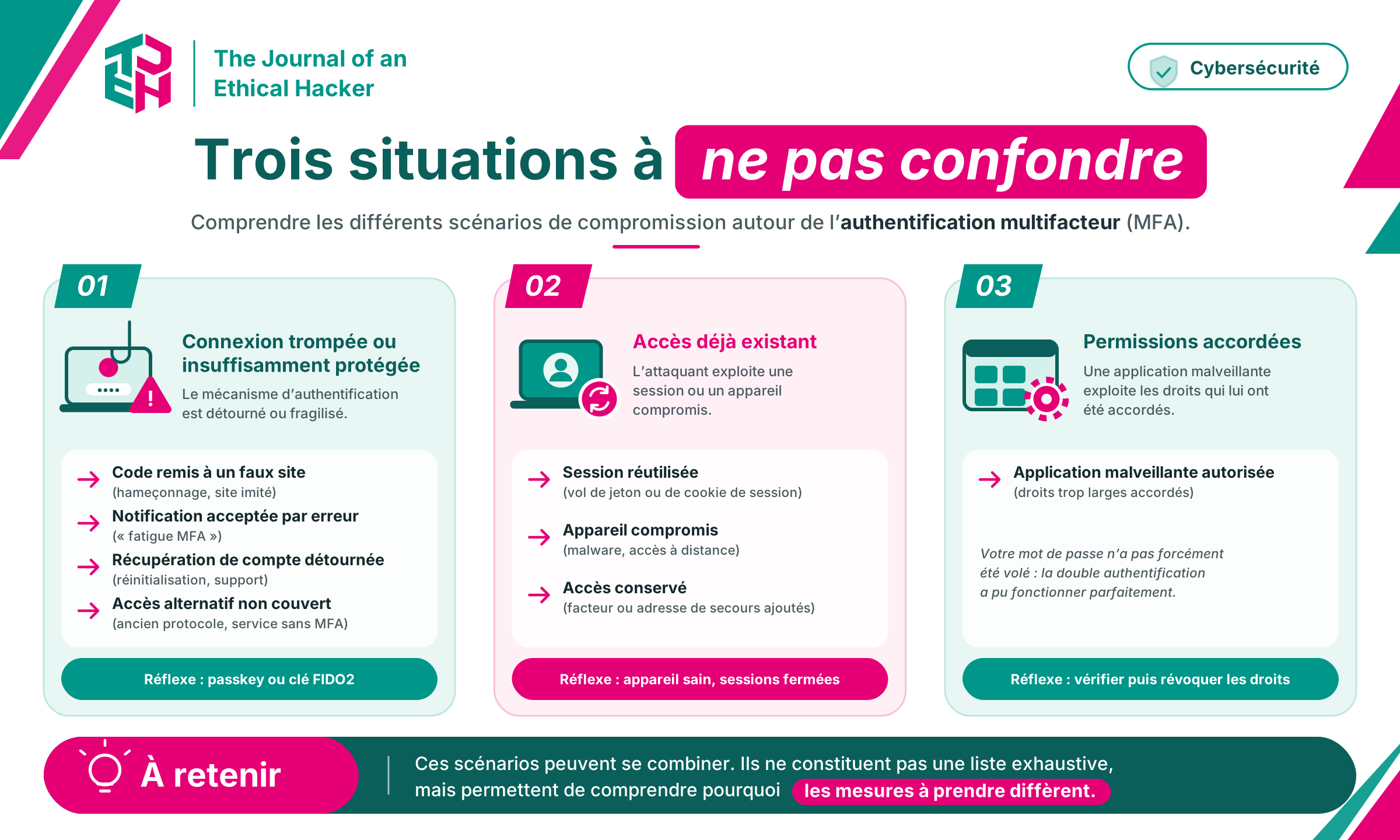
The connection is deceived or insufficiently protected: code delivered to a false site, notification accepted in error, diverted recovery or alternative access not covered.
Access already exists: reused session or compromised device. The attacker then takes advantage of what happens after the connection.
Permissions have been granted: a malicious application is exploiting the rights received. This is not necessarily a circumvention of MFA.
These scenarios can be combined. They are not an exhaustive list, but help to understand why the measures to be taken differ.
1. The fake site that also asks you for your code
Family: deceived connection
Fictional example: you receive a message announcing the suspension of your messaging. The page looks like your usual service. You enter your password, then the requested temporary code.
Some fraudulent sites transmit this information to the real service in real time. This is called an “adversary-in-the-middle” (AiTM) attack: the attacker comes between you and the service. The short validity period of the code is not enough if he uses it immediately.
The good reflex: open the application yourself or your usual favorite. Never give a code to anyone who contacts you. If the service allows it, choose a passkey or a FIDO2 key: its operation links the authentication to the legitimate site, unlike a code that you can copy on a fake site. Reference: NCSC, Comparison of Authentication Methods.## 2. Theft of an already open session
Family: existing access
After you log in, the service usually retains proof of your authentication, often in a session cookie. Imagine a badge given after an identity check: you do not need to present your supporting documents again at each door.
Malware, particularly an infostealer, can copy some of this evidence. If they are still valid and reusable, an attacker can sometimes resume the session from another device without repeating the double authentication. Not all cookies allow this: the risk depends on the type of cookie and the protections of the service.
Fictional example: you install software downloaded from an unofficial site. A few days later, an alert reports a connection from another country, without any code request.
The right reflex: protect your device, limit installed extensions and apply updates. In the event of an intrusion, use the disconnect active sessions function. Changing the password does not necessarily close all existing sessions. Reference: OWASP, session management.
3. Repeated notifications until bad validation
Family: deceived connection
Fictional example: your phone displays several connection requests while you do nothing. You eventually agree to stop the notifications.
This is the principle of “MFA fatigue”: provoking repeated requests in the hope of obtaining validation. Some attacks add a call from a fake technician to make the request credible.
The good reflex: refuse any request that you did not trigger and report it to official support. Number matching, which requires you to enter the number displayed when you log in, reduces accidental validations. However, it does not make the method resistant to all forms of phishing. Reference: MITER ATT&CK, T1621.
4. Phone number, account recovery or support
Family: deceived or insufficiently protected connection
Fictional example: you suddenly lose network on your phone. A few minutes later, you receive password reset alerts: your number has just been transferred to another SIM card.
This diversion, called “SIM swapping”, can allow a fraudster to receive your SMS. An attacker can also aim for a recovery procedure that is less robust than the normal connection.
Support can also be the target. In some attacks, the fraudster does not try to bypass double authentication: he calls support pretending to be you, and obtains the reset of your second factor. In business, this justifies reinforced identity verification before any MFA reset, for example a callback on a known number or validation by the manager.
The right reflex: secure your recovery email, check emergency contact details and keep your recovery codes safe. Choose a more robust method than SMS when available. If SMS is your only option, enabling it is still better than using just a password. Reference: OWASP, MFA Methods and Recovery.## 5. The device is compromised, even if the connection is protected
Family: existing access
The previous section on sessions concerns a cookie stolen and then reused elsewhere. Here the attacker acts directly from your device.
Fictional example: you install an extension presented as a practical tool. It has excessive permissions and can read or modify certain pages you view.
Depending on its capabilities and permissions, malware can act from your device, in an already open session. So he doesn't need to steal a cookie to reuse it elsewhere. Double authentication verifies your connection; it does not guarantee that your computer is healthy.
The right reflex: limit extensions, check their permissions and keep your system and browser up to date. If you suspect an infection, use another trusted device to secure your accounts and request assistance to examine the affected device. [Reference: to be added]
6. You authorize a malicious application
Family: permissions granted
Fictional example: a tool promises to help you manage your documents. A real login page then asks you to authorize it to read your files or your email. You accept without reviewing the requested rights.
This delegation mechanism is often called OAuth. In a consent attack, the application obtains the permissions you grant it. Your password may not have been stolen and your two-factor authentication may have worked perfectly. This is authorized data access, not necessarily a complete takeover of the account.
The good reflex: check the editor and permissions before accepting. In Account Settings, review connected apps and revoke suspicious permissions. A password change does not replace this verification. Reference: Microsoft, Consent Phishing Protection.
7. Another front door does not require a second factor
Family: insufficiently protected connection
In some configurations, the primary connection requires MFA, but a legacy protocol, exception, or application password allows alternate access. It depends on the service and the settings: this is not a possibility present everywhere.
Fictional example: the browser connection is protected, but an old messaging application still uses separate access that does not require additional validation.
The good reflex: for a personal account, check the application access and passwords still in use. In business, have exceptions and old connection methods inventoried before removing or replacing them. An MFA enabled on a page does not prove that all access is covered. Reference: Microsoft, blocking legacy authentication.
8. After an intrusion, the attacker prepares his return
Family: existing access
If an attacker has already obtained sufficient rights and the service controls allow it, he can attempt to add his own means of authentication or modify a recovery address. This is not an initial method of entry: it is a way of maintaining access after intrusion.Fictional example: you receive an email informing you that a new security key or a new phone number has been added to your account, even though you have done nothing.
The good reflex: examine the connection methods and recovery details, not just the password. Report any unknown changes immediately. The addition of a new factor must itself be protected by appropriate controls. Reference: OWASP, MFA Factor Change.
SMS, application, notification or passkey: what is the difference?
| Method | Protects against | Remains exposed to |
|---|---|---|
| SMS code | Theft of the only password | Number hijacking, fake sites |
| Code in an application | Theft of the only password, SIM swapping | Recopied on a fake site |
| Notification to approve | Theft of the only password | MFA fatigue; number matching limits risk |
| Passkey or FIDO2 key | Theft of the only password, phishing of identifiers | Infected device, stolen session, fragile recovery |
Do passkeys solve everything?
Passkeys, also called access keys, allow you to log in with cryptographic proof, usually unlocked by your device's code or biometrics. You do not copy a secret on the page: the proof is linked to the expected service. This is what makes them resistant to credential phishing. FIDO Alliance Explanation.
However, they do not clean an infected computer or fix a fragile recovery procedure. When a passkey is synchronized in a cloud account (Apple, Google or a password manager), the security of this account also becomes essential: if it is poorly protected or poorly recoverable, it becomes the weak link. Sessions and the addition of new connection methods must also be protected. [Reference: OWASP, passkey security]> 💡 Does jargon scare you? Don't panic. To better understand the pitfalls mentioned above, here is a short caption with pictures of the technical terms in this article.
- Session cookie (the “access badge”): small file that your browser keeps after you log in. It serves as a badge: the site recognizes you without asking you for your password on each page. If a hacker steals it and it's still valid, they can sometimes enter your account without redoing the two-factor authentication.
- AiTM attack, or Adversary-in-the-Middle (the “dishonest factor”): the hacker creates a fake site that copies the real one. When you enter your password and code, it transmits them directly to the real site, connects for you and retrieves your access badge (the cookie).
- Infostealer (the “invisible burglar”): malware hidden in your device. Its mission: to search your browsers to steal saved passwords and session cookies.
- Consent attack, or OAuth (the “contract signed too quickly”): OAuth is the mechanism behind the “Connect with Google” or “with Facebook” buttons: it allows you to give an application certain rights over your account. A malicious application can trick you by requesting excessive rights (read your emails, for example). By accepting, you open the door for her yourself, without her having to steal your password or bypass double authentication.
- Passkey or FIDO2 key (the “tailor-made lock”): modern alternative to the password. Your device uses a cryptographic key, unlocked by your fingerprint, face or passcode. It is linked to the legitimate site: it refuses to work on a fake pirate site.
(https://cheatsheetseries.owasp.org/cheatsheets/Passkey_Security_Cheat_Sheet.html).
You suspect fraudulent access: what to do?
From a trusted device, open the service through its app or official address. Do not change anything on the device you suspect is infected: malware could see your new password.
- Change the password and use the option to close other sessions, if it exists.
- Check the saved recovery addresses and authentication methods. Remove any you do not recognize after ensuring your own access.
- Revoke permissions from suspicious apps and review alternative access, such as app passwords, if your service offers them.
- Review recent logins and contact official support to recover the account or report the incident. For messaging, also check the unknown transfer rules.
- For a professional account, quickly notify your IT team, even without a confirmed intrusion: unsolicited notifications are already a signal to report.
These actions are a first response. If the device is compromised, securing just the account isn't enough: have the device examined as well.
The reflex to remember
Keep two-factor authentication enabled. Reinforce it with a phishing-resistant method where possible, and think about what happens before, during and after the connection.You can start today with your main email: check its connection method, open sessions and recovery methods. It often provides access to recover your other accounts.