My first CTF: where to start?
Would you like to try cybersecurity, but the words “terminal”, “flag” or “challenge” make you feel like you’re in the middle of a conversation? A CTF can help you learn by doing. Imagine a digital escape game: you read instructions, you spot clues and you move towards a solution. You don't need to know everything before you start.
What exactly is a CTF?
CTF stands for Capture The Flag. In many CTFs, you solve small challenges to find text called flag. You enter it into the platform to validate your answer and, in competition, earn points. Its format varies depending on the organizer: TJEH{bravo} is an invented example here.
There are several CTF formats. To start, choose independent challenges, with clues, accessible at your own pace. You can start with a single exercise: your goal is to understand a process, not to complete the entire platform.
A CTF takes place within a framework defined by its organizers. Use only the files, accounts and machines intended for the exercise, and respect its rules. A site accessible on the Internet is not automatically a training ground.
What do you need?
For a simple first exercise, a computer, a browser and a notebook may be enough. Some challenges will then require a terminal, tool or connection to a laboratory machine: follow their instructions when it becomes necessary.
No need to install a collection of tools or change operating systems from day one. Choose a challenge marked "beginner" or "introductory", then check the prerequisites. If the vocabulary is new, write down the words and look for their meaning one by one.
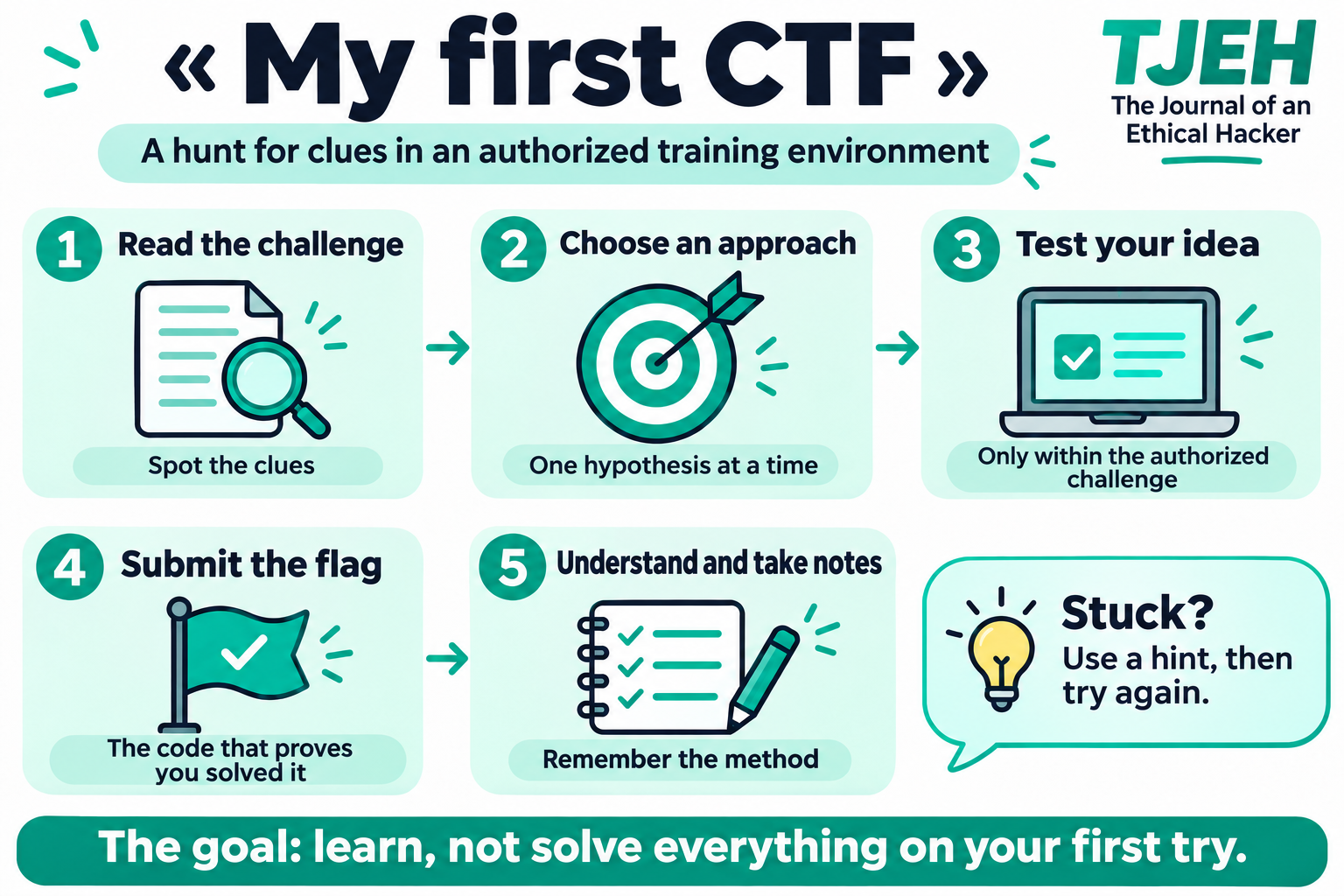
The TJEH method in five steps
1. Read the statement as a game instruction
Before you click everywhere, ask yourself: what should I find? What was given to me? A text file, an image, a laboratory page or a message? The challenge title and unusual words may be clues, but they are not evidence alone.
Restate the objective in your own words. For example: “I need to find a hidden code in the file provided. » If you can't explain it simply, reread the instructions before choosing a tool.
2. Choose a single track
A hypothesis is an idea that you are going to test. For example: “The statement talks about the beginnings of sentences; maybe their first letters are important. » Write this idea down before testing. This will prevent you from taking actions without knowing what you are looking for.
3. Test and see the result
Do a small check adapted to your hypothesis, in the authorized environment. Observe what changes. Does the result confirm your idea? If not, write down what you learned and try another path. A failed attempt can still eliminate a bad hypothesis.
4. Validate the flagWhen you find an answer, follow the requested format exactly: capital letters, curly brackets and characters often count. Submit it in the field provided. If the platform refuses it, reread the instructions and check your copy before starting the whole analysis again.
5. Understand and note
After success, keep a short record: the useful clue, your reasoning, the action that worked and what you learned. The flag is used to validate the challenge; the method will serve you for the next one.
A mini-challenge to try now
Here is a fictional exercise created for this guide. It does not require any tools and is not the correction of an ongoing competition.
Instruction: “The answer is hidden at the beginning of each line. Assemble the four letters and surround them with TJEH{…}. »
Understand before acting.
Observe the details.
Ask for a hint if necessary.
Explain what you understood.
Take a moment to search before reading on.
Solution explained: the first letters are C, O, D and E. The expected answer is therefore TJEH{CODE}. You followed the clue, assembled the letters and respected the requested format.
This little exercise leads to a useful reflex: start from the clue, formulate a hypothesis, then verify it. The real challenges will be more varied, but this habit will remain valuable.
Which category to choose?
| Category | What you explore | A first accessible objective |
|---|---|---|
| General skills / Linux | Basic files, folders and commands | Find and read the correct file in a laboratory |
| Web | How a page works and exchanges with a server | Observe a challenge page and understand the information it displays |
| Cryptography | Transformed messages and ways to understand them | Recognize simple coding; learn that an encoding is not necessarily an encryption |
| File Analysis | The clues present in a document or an image | Identify the type of a provided file and examine its properties |
| OSINT | Research and cross-checking of public information | Solve a challenge investigation without harassing or exposing people |
Start with the category that intrigues you. The difficulty depends above all on the exercise: a “Web” category is not always easier than a “Linux” category.
What if I block?
Getting stuck is part of learning. You can give yourself about twenty minutes on a track, then take stock: have I discovered something or am I repeating the same action? This benchmark is a suggestion, not a competition rule.
Reread the statement, consult a clue if the rules allow it, or temporarily switch to another challenge. To ask for help, explain what you tried and the results you got. “I think the clue means the first few letters, but my answer is refused” is more useful than “It doesn't work”.
In training, a correction can help you after a real attempt. Then close it and do the reasoning again yourself. During a competition, respect the rules on outside help, AI and sharing solutions. Do not post a flag or correction until the organizer prohibits it.
Where to take your first steps?picoCTF offers cybersecurity learning through challenges, with training activities and competitions. The Carnegie Mellon program is free and is aimed at several levels. Start with the introductory exercises, then check the registration conditions on the platform. Official presentation by Carnegie Mellon.
Bandit, from OverTheWire, is designed for complete beginners and progresses by levels. This is a useful avenue for learning about files and the command line. Its first level explains how to connect; take the time to read this step rather than copying a command without understanding it. Official Bandit Guide.
Your first goal: a 30-minute session
- 5 minutes: choose a beginner exercise and read its rules.
- 15 minutes: spot clues and test one or two hypotheses.
- 5 minutes: use an authorized clue or take stock of the blockage.
- 5 minutes: note one thing understood and the next thing to try.
Didn't find the flag? Your session can still be useful if you now know how to explain a word, recognize a clue or avoid a false lead. Ranking isn't the only measure of your progress.
To get started today: choose a single challenge, read it quietly and keep track of your reasoning. On TJEH, we will move forward the same way: simple explanations, concrete examples and the right to learn step by step.